Follow Every Car from Check-in to the Gate, in Arabic and English
Auto-one Services ERP is built only for car service centers. One job card follows each car through check-in, quotation, work stations, quality control, invoice, payment and a gate exit permit, across all your branches.
From the Front Desk to the Gate, in One System
Every step of the car's journey is connected, so reception, technicians, the cashier and the guard all see the same truth
Check-in with Photo Evidence
Find the car by plate, VIN or phone, record odometer, fuel and the customer's complaint, take four photos and capture a signature. The card gets a gap-free number and a printed receipt with a QR code.
- Four required photos plus extras
- Customer signature on the screen
- Comebacks flagged automatically
Live Workshop Board and Scanning
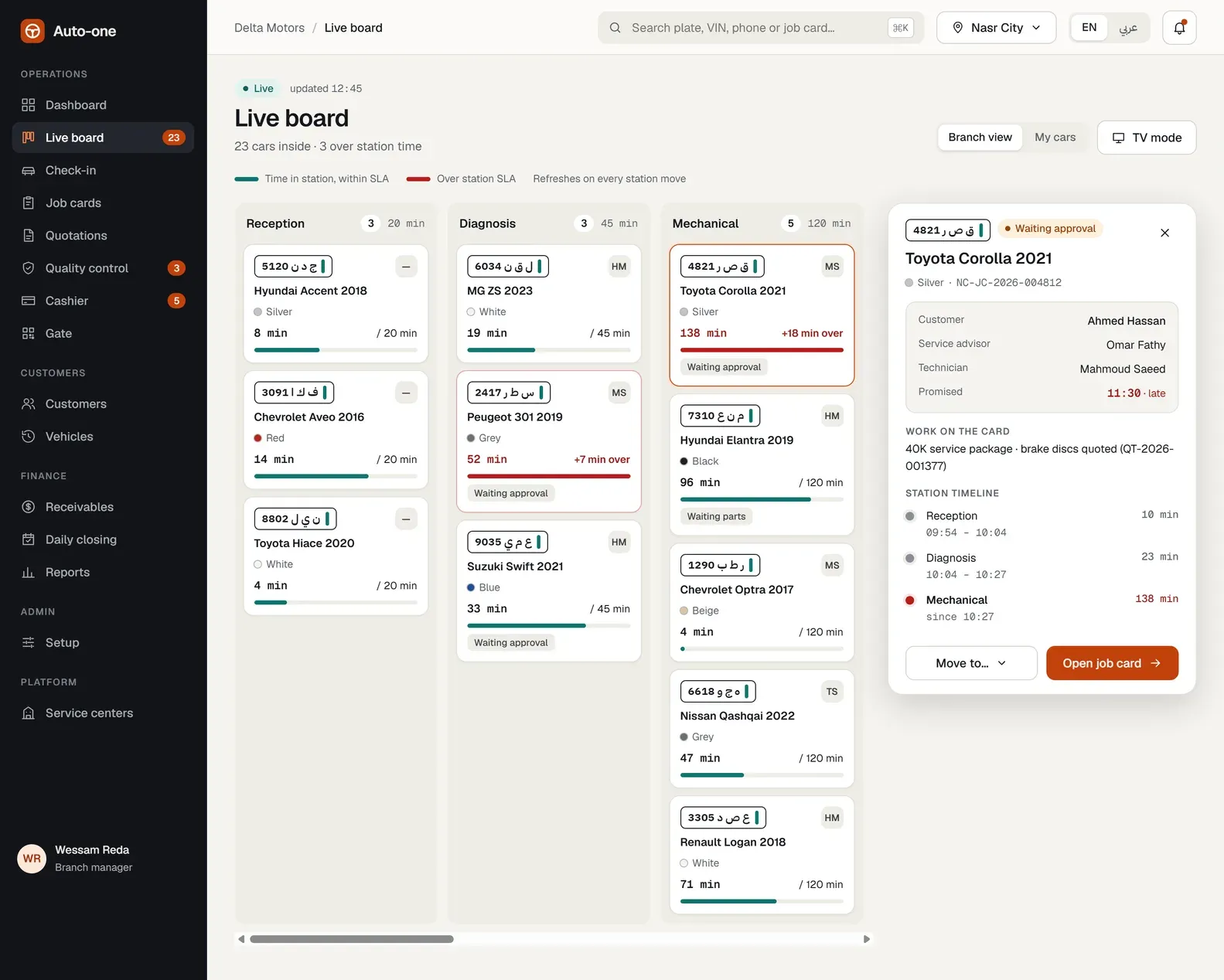
One column per station and one tile per car, with minutes in the station against the SLA. Technicians scan the car's QR with their phone camera to move it, and the board updates on every screen within seconds.
- Late cars turn red while there is still time
- TV mode for a wall screen
- Time per station captured automatically
Quotations Approved Online
Send the customer a link in Arabic or English. They approve or reject each line from their phone, with no app and no account. Every decision is stored with its time and channel.
- Per-line approval, at the counter, by phone or online
- Advisor sees when the quote was opened
- Diagnosis fee if everything is rejected
Quality Control and Comebacks
A 14-item checklist with notes and photos on every failure. A failed car returns to the rework station, and a passed car moves to Ready and the customer is told. Supervisors review comebacks before invoicing.
- A car reaches Ready only by passing QC
- Fail and comeback rate per technician
- Comeback decisions feed the warranty engine
Invoicing, Payments and VAT
The cashier sees every car ready to invoice. Warranty work is priced at zero by rule, discounts are limited by role, and VAT is an optional switch saved on each invoice. Part payments are allowed and overpayment is refused.
- Gap-free invoice numbers per branch and year
- Cash, card, transfer and cheque
- Credit notes with a required reason
Exit Permit and Gate Control
Paying the invoice issues an exit permit with a QR code. The guard scans it on a phone: valid permits release the car once, and unpaid or already used permits are refused with the reason.
- A permit works only once
- Every release and refusal is logged
- Manager can release a company car on credit
See Auto-one at Work
From the live workshop floor to branch sales reports, in English or Arabic.
Made for How Service Centers Really Work
Built around the car's physical journey, with the rules a workshop needs already inside
Arabic and English Throughout
Screens, invoices, receipts, e-mails and Excel exports work in both languages with proper right-to-left layout.
Prices Follow Your Branches
Package prices per branch and model group, with valid-from dates, so a price rise can be scheduled for next month.
Receivables and Reminders
Aging buckets, customers ranked by risk, credit-limit use and automatic e-mail reminders after the due date.
Separate Data per Center
Each service center's data is isolated from every other center, with roles, branch access, login protection and an audit log.
Parts and Stock
Issue parts to a job card, return them, and get an alert when stock falls below the reorder level.
Reports and Dashboard
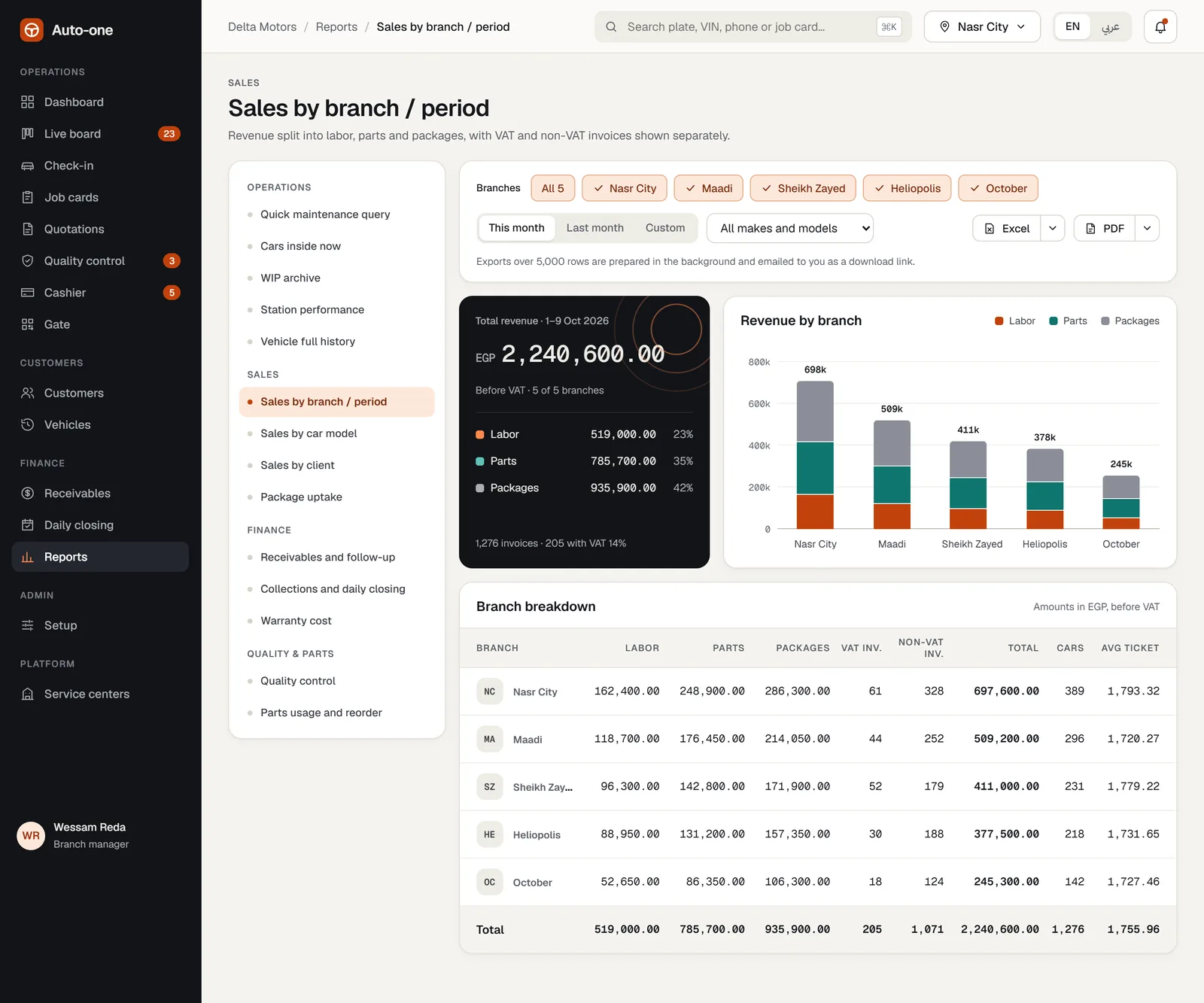
Sales by branch, model and client, station performance, warranty cost and receivables, with Excel export.
Who Uses Auto-one?
Any car service business that wants fewer lost cars, fewer disputes and cleaner money
Service Centers and Garages
Mechanical, electrical, body and other stations with a service advisor, technicians and a cashier.
Multi-Branch Networks
Separate branches with their own prices, stock and daily closing, and one head-office view.
Dealer Service Departments
Packages by model group, warranty rules and a clear history for every vehicle.
Fleet and Company Accounts
Credit limits, release on credit with manager approval and automatic reminders for overdue invoices.
Quick Service and Maintenance Shops
Fixed-price packages such as a 40K service, priced from the branch list at the counter.
Owners Who Want Control
Cash differences, comebacks and late cars visible the same day, not at the end of the month.
From Demo to Your First Car on the Board
Three steps, with help from our team
See a Demo
Tell us about your center and we will show the system with sample cars, quotations and invoices.
Set Up Your Center
Add your branches and stations, packages and prices, car catalog and parts, and invite your staff with the right roles.
Check In the First Car
Check in a car, put it on the live board and follow it to the gate. Reports and alerts start working from day one.
Auto-one Frequently Asked Questions
What is Auto-one Services ERP?
Auto-one is a cloud system for car service centers. It covers check-in, job cards, the live workshop board, quotations, quality control, invoicing, payments, exit permits, receivables, daily closing and reports.
Is it available in Arabic?
Yes. The screens, printed invoices, receipts, e-mails and Excel exports work in Arabic and English, with full right-to-left support.
Does it work with several branches?
Yes. Each branch has its own stations, prices, stock and daily closing, and users see only the branches assigned to them unless their role covers all branches.
Is VAT required on every invoice?
No. VAT is off by default and switched on per invoice by authorized roles. The rate is saved on the invoice, so later settings never change an issued invoice.
Does it replace my accounting system?
Auto-one is a standalone system for running the workshop. It has no full general ledger, payroll or supplier purchase orders, and exports to Excel for hand-off to your accountant.
Do I need special hardware?
No. Any phone with a camera scans QR codes, and any TV with a browser shows the live board. The app installs on a phone or desktop like an app.
See Auto-one with Your Own Workflow
Book a demo and we will show how your service center would run on it, from the first check-in to the gate